Detecting Create vs Update Triggers in Dataverse Power Automate Flows
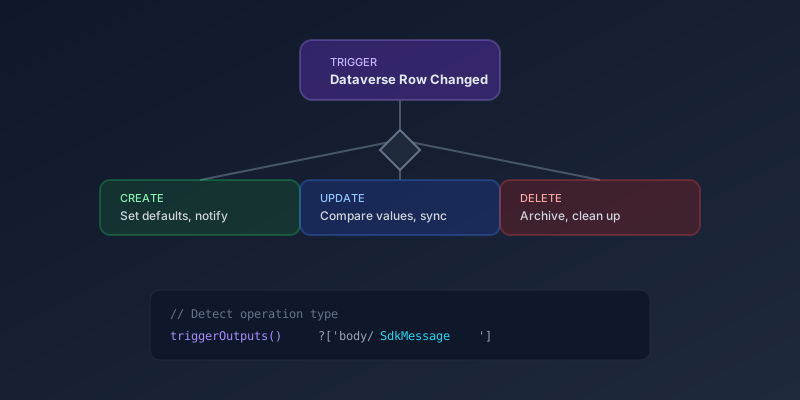
The Dataverse connector's "When a row is added, modified or deleted" trigger fires for multiple operation types. When your flow needs different logic for creates versus updates, here is how to detect which one fired.
The Modern Approach (2026)
The current Dataverse connector provides the trigger type directly in the trigger outputs. Use this expression:
@triggerOutputs()?['body/SdkMessage']
This returns one of:
Create— a new row was addedUpdate— an existing row was modifiedDelete— a row was removed
Implementing Conditional Logic
Add a Switch action right after the trigger:
Switch on: @triggerOutputs()?['body/SdkMessage']
Case: Create
- Set default field values
- Send welcome notifications
- Create related records
Case: Update
- Compare old and new values
- Trigger approval workflows
- Sync changes to external systems
Case: Delete
- Archive the record
- Clean up related data
- Send deletion notifications
Comparing Old and New Values on Update
For updates, you often need to know what actually changed. The trigger provides pre-operation values:
@triggerOutputs()?['body/_previousValue_fieldname']
Compare with the current value to determine if a specific field was modified:
@not(equals(
  triggerOutputs()?['body/statuscode'],
  triggerOutputs()?['body/_previousValue_statuscode']
))
This is far more efficient than fetching the old record with a separate Get action.
Filtering Triggers
Instead of detecting the type in-flow, you can filter at the trigger level:
- In the trigger configuration, set Change type to only the operations you care about
- Use Filter rows to further narrow which records fire the flow
- Use Select columns to limit the payload and improve performance
This reduces unnecessary flow runs and keeps your run history clean.
Common Pattern: Single Trigger, Shared Logic
For flows where create and update share most logic but differ in a few steps:
- Run shared validation and data enrichment first
- Use a Condition to branch only where behavior differs
- Converge back to shared post-processing
This avoids maintaining two nearly identical flows for create and update scenarios.
Key Takeaway
Use triggerOutputs()?['body/SdkMessage'] to detect the operation type. Filter at the trigger level when possible to reduce unnecessary runs. And always check pre-operation values on updates rather than making a separate API call.
Comments
No comments yet. Be the first!