Autonomous AI Agents in D365 Sales and Customer Service: What You Actually Need to Know
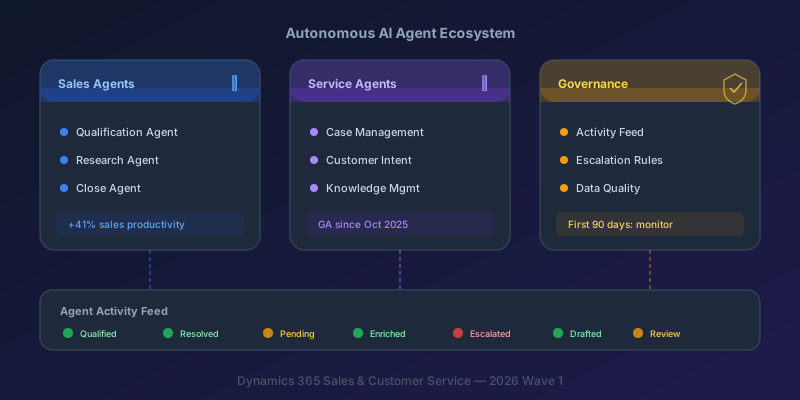
Microsoft has shipped autonomous AI agents into Dynamics 365 Sales and Customer Service. Not Copilot suggestions in a sidebar. Agents that research leads, draft outreach, engage in multi-turn conversations with prospects, and resolve customer service cases independently. This is a significant shift, and most organizations deploying them are making the same mistake: treating agent deployment as a feature toggle instead of an organizational change.
Here is what the agents actually do, where they break, and the governance you need before turning them on.
What "Autonomous" Actually Means Here
First, the distinction that matters: Copilot is user-triggered and suggestion-based. You ask it a question, it responds. You decide whether to act on its output.
Agents are different. They run in the background, triggered by events — a new lead arriving, a case being created, an SLA threshold being crossed. They take actions: create records, send emails, update fields, escalate to humans. They do not wait for you to ask.
The important qualifier: agents operate within guardrails you configure. They are not general-purpose AI. They follow rules you define — qualification criteria, outreach templates, escalation thresholds, approval gates.
Deploying agents without governance is like giving an intern admin access. They will work hard, but the results depend entirely on the boundaries you set.
The Sales Agent Ecosystem
Sales Qualification Agent (SQA)
The SQA is the most mature agent in the ecosystem. It monitors incoming leads and autonomously:
- Researches them using web data, CRM history, and LinkedIn (if connected)
- Scores them against your Ideal Customer Profile (ICP) criteria
- Generates personalized first-touch outreach
- Engages in multi-turn email conversations with prospects
- Escalates qualified leads to sales reps with a research summary
The SQA now has multi-agent capabilities — it delegates subtasks to specialized sub-agents rather than handling everything in a single chain. This makes it more reliable for complex qualification scenarios.
Configuration matters: you define the ICP criteria, qualification thresholds, outreach tone, email templates, and escalation rules. The agent is only as good as these inputs.
What it gets right: initial research and data enrichment, first-touch personalization, consistent follow-up cadence. It eliminates the 15-20 minutes of manual research per lead that most reps skip anyway.
What it gets wrong: nuanced industry context, reading competitive dynamics, knowing when a lead is being polite but not interested. Human judgment still wins on the edges.
Sales Research Agent
This agent feeds market and company intelligence to the SQA. It pulls from web data, news, company filings, and internal CRM notes to build a prospect profile.
The practical value: it automates the research step that reps are supposed to do before every call but rarely have time for. Microsoft's December 2025 SQA benchmark post reports double-digit improvements over a ChatGPT baseline on research, outreach, and engagement-quality dimensions — meaningful, but more modest than the marketing copy elsewhere implies.
Sales Close Agent
The Close Agent assists with later-stage deals: suggests pricing strategies, identifies risk signals (deal stagnation, buyer disengagement, competitor mentions), and recommends next actions.
Honest take: this is the weakest of the three today. It works best as a reminder engine — surfacing deals that need attention — rather than as a strategic advisor. It requires a minimum of six months of win/loss data in your CRM to produce useful recommendations. If your opportunity data is sparse, it will give you generic advice.
The Customer Service Agent Ecosystem
Case Management Agent
Reached general availability in October 2025. It autonomously triages incoming cases:
- Categorizes by type and urgency
- Prioritizes based on SLA, customer tier, and sentiment
- Routes to the appropriate queue or agent
- Resolves common issues without human intervention — using knowledge base articles, scripted responses, or automated actions (initiate a return, update a subscription, reset a password)
The 2026 Wave 1 expansion adds cross-channel resolution: the agent handles the same case whether it comes in via email, chat, voice, or social media.
Customer Intent Agent
Goes beyond keyword matching for case routing. It understands that "I want to cancel" and "I want to know the cancellation policy" are different intents requiring different handling — the first gets routed to retention, the second gets a knowledge base article.
The intent model learns from your historical case data, so organizations with a deep backlog of resolved cases generally see better intent classification than those starting fresh — the model has more signal to work from.
Customer Knowledge Management Agent
Monitors resolved cases and drafts knowledge base articles when an issue is being resolved repeatedly without a corresponding KB entry. The exact trigger logic is configurable; the goal is the same — turn closed cases into reusable knowledge.
Critical detail: drafts require human review before publishing. This agent is not fully autonomous and should not be. Knowledge articles represent your organization's official guidance — automated drafting is a time-saver, not a replacement for editorial judgment.
Agent Activity Feed
This is the supervision layer, and it is where you will spend most of your time in the first 30 days post-deployment.
The Activity Feed shows every action every agent takes in real time:
- Which agent acted
- What action it took (created record, sent email, updated field, escalated)
- What triggered the action
- The outcome
Filter by agent type, action type, or outcome. Set alerts for specific patterns (agent sending more than X emails per hour, agent escalation rate exceeding threshold).
This is not optional. If you deploy agents without monitoring the Activity Feed daily, you will discover problems weeks later through customer complaints instead of proactive observation.
The Governance Framework You Need Before Day One
Data Quality Is Non-Negotiable
Dirty CRM data causes agent hallucinations. Not theoretical risk — practical, measurable failure. Duplicate contacts mean duplicate outreach (embarrassing). Missing industry fields mean poor qualification scoring (wasteful). Stale opportunities mean inflated pipeline forecasts (misleading).
Pre-deployment data quality checklist:
| Data Issue | Agent Impact | Fix Priority |
|---|---|---|
| Duplicate contacts | Duplicate outreach, conflicting engagement | Critical |
| Missing industry/company size | Poor ICP scoring, wrong qualification | High |
| Stale opportunities (6+ months no activity) | Inflated pipeline, wrong forecasts | High |
| Inconsistent lead sources | Attribution errors, skewed channel analysis | Medium |
| Outdated contact emails | High bounce rate, sender reputation damage | Critical |
Run deduplication, validate email addresses (target bounce rate below 5%), and clean up inactive records before enabling agents. The agents will amplify whatever data quality you feed them — good or bad.
Escalation Rules
Define clear boundaries for what agents can do without human approval.
Recommended starting point for the first 90 days:
Agents CAN autonomously:
- Research and enrich lead/contact records
- Score and qualify leads
- Draft outreach emails (saved as drafts, not sent)
- Categorize and route cases
- Resolve cases using existing KB articles
- Update internal fields (status, priority, category)
Agents CANNOT autonomously (require human approval):
- Send external communications (emails, messages)
- Modify financial records (quotes, orders, invoices)
- Close or disqualify leads above a certain value threshold
- Escalate to external teams or partners
- Create or modify KB articles visible to customers
Gradually expand autonomy as you validate outcomes. After 90 days of monitoring, you will know which guardrails to relax and which to keep.
Organizational Change
This is the part most deployments skip. Sales reps and service agents need to understand that their daily workflow has changed:
For sales reps:
- Morning routine now includes reviewing the Agent Activity Feed
- Check agent-drafted emails before approving send
- Provide feedback on qualification scores (this improves the model)
- Focus time shifts from research and data entry to relationship building and deal strategy
For service agents:
- Review agent-resolved cases for quality (sample 10-20% in the first month)
- Escalation is no longer failure — it is the agent recognizing its limits
- Monitor the Knowledge Management Agent's draft articles weekly
For managers:
- Add agent performance metrics alongside rep/agent metrics
- Track: agent resolution rate, escalation rate, qualification accuracy, average time to qualification
- These metrics are as important as individual rep performance in an agent-augmented org
The Migration Elephant: Legacy Workflows
Many organizations still have classic CRM workflows and plugin assemblies handling post-qualification and post-resolution automation. This matters because autonomous agents trigger Power Automate cloud flows, not legacy workflows.
If your post-qualification automation (assignment rules, notification chains, data enrichment) runs on classic workflows, the agents will do their job and then nothing will happen downstream. The qualification succeeds but the lead sits unassigned.
Migration path:
- Audit every workflow triggered by events that agents will touch (lead qualification, case creation, case resolution)
- Map the workflow logic to Power Automate cloud flow equivalents
- Test in a sandbox environment with agents enabled
- Deprecate the classic workflows only after confirming cloud flows handle every scenario
This is the single biggest blocker teams encounter during agent deployment and the one most often overlooked in planning.
Key Takeaway
The autonomous agents in D365 Sales and Customer Service are production-ready. The Sales Qualification Agent and Case Management Agent are mature enough to deliver real value today. But they amplify whatever you feed them — clean data produces good results, dirty data produces confidently wrong results at scale.
Build your governance framework (escalation rules, activity monitoring, data quality standards) before enabling agents. Budget 30 days of active monitoring post-deployment and treat it as a go-live, not a feature toggle.
The question is not whether to deploy agents. It is whether your data and processes are ready for an agent to act on them autonomously. If you would not trust a new hire with the same data and permissions, you are not ready.
Keep reading
MCP Explained: How Claude Connects to Your Dataverse Data
An introduction to the Model Context Protocol and how the Dataverse MCP server lets Claude read and write business data through natural language.
Querying Dataverse from Claude: A Practical MCP Walkthrough
A hands-on example of using the Dataverse MCP server with Claude to query tables, create records, and update data in Dynamics 365 through natural language.
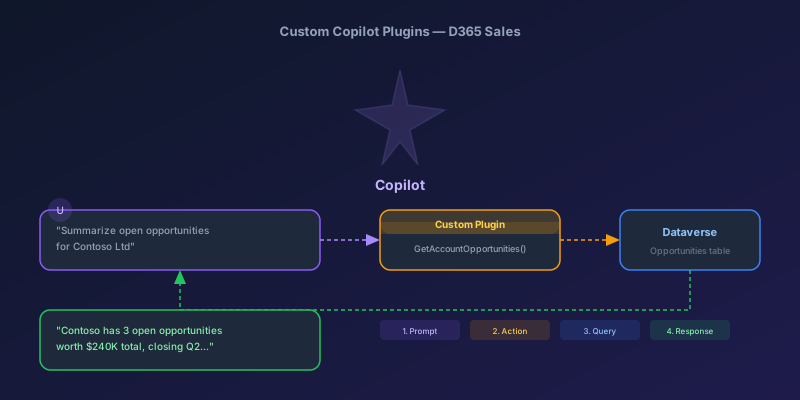
Building Custom Copilot Plugins for D365 Sales: Your First Action Step by Step
A hands-on tutorial for creating custom Copilot plugins in Dynamics 365 Sales — from defining a custom API to registering a plugin that Copilot can invoke, with real examples and permission gotchas.
Newsletter
New posts, straight to your inbox
One email per post. No spam, no tracking pixels, unsubscribe anytime.
Comments
No comments yet. Be the first.