Chain of Responsibility in D365 F&O: Extending Standard Logic Without Overlayering
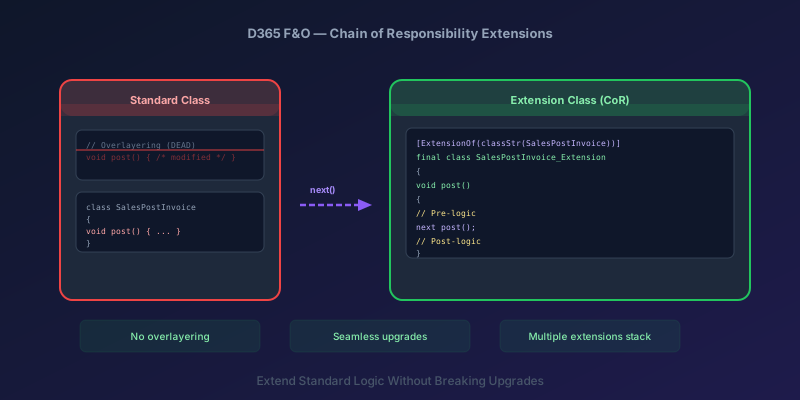
Overlayering is dead. If you are still modifying standard X++ classes directly in D365 Finance & Operations, you are creating upgrade debt that compounds with every platform update. Chain of Responsibility (CoR) is the extension model that replaced it — and understanding how it works is non-negotiable for any F&O developer working on customizations today.
This guide covers the mechanics, the patterns that work, and the mistakes that will cost you hours in debugging.
What Chain of Responsibility Actually Is
CoR lets you wrap methods on standard classes without modifying the original code. Your extension class intercepts the method call, runs your pre-logic, calls next to execute the original (or the next extension in the chain), and then runs your post-logic.
The runtime builds a chain: your extension wraps the standard method. If another ISV or extension also wraps the same method, they form a chain — each calling next to pass control to the next link. The original method is always the last link.
Your Extension → ISV Extension → Standard Method
     ↓ next          ↓ next           (executes)
This means multiple extensions can wrap the same method without conflicting — as long as each calls next.
The Basics: Your First CoR Extension
Here is the minimal structure. We are extending SalesLineType to add validation before a sales line is inserted.
[ExtensionOf(classStr(SalesLineType))]
final class SalesLineType_Extension
{
    public void validateWrite(boolean _skipCreditCheck)
    {
        SalesLine salesLine = this.salesLine();

        // Pre-logic: custom validation before the standard insert
        if (salesLine.SalesQty > 1000
            && !salesLine.OverrideHighQtyApproved)
        {
            throw error("Quantities over 1000 require manager approval.");
        }

        // Call the next link in the chain (standard method or another extension)
        next validateWrite(_skipCreditCheck);

        // Post-logic: runs after the standard method completes
        Info(strFmt("Sales line %1 validated successfully.", salesLine.ItemId));
    }
}
Rules You Cannot Break
- The class must be
final— extension classes are always declaredfinal - Use
ExtensionOfattribute —[ExtensionOf(classStr(TargetClass))]links your extension to the target - You must call
next— if you skip thenextcall, you break the chain. The standard method never executes. Other extensions in the chain never execute. This is the single most common CoR bug - Method signature must match exactly — same name, same parameters, same return type. A mismatch means your extension silently does nothing
- No constructor extensions — you cannot wrap
new(). Use event handlers oronConstructingdelegates instead
Wrapping Methods with Return Values
When the method returns a value, you call next and capture the return:
[ExtensionOf(classStr(PurchFormLetterInvoice))]
final class PurchFormLetterInvoice_Extension
{
    protected boolean checkInvoicePolicies(
        VendInvoiceInfoTable _vendInvoiceInfoTable)
    {
        boolean result = next checkInvoicePolicies(_vendInvoiceInfoTable);

        // Post-logic: add a custom policy check after standard checks pass
        if (result)
        {
            result = this.checkCustomCompliancePolicy(
                _vendInvoiceInfoTable);
        }

        return result;
    }

    private boolean checkCustomCompliancePolicy(
        VendInvoiceInfoTable _vendInvoiceInfoTable)
    {
        // Your custom compliance validation
        if (_vendInvoiceInfoTable.InvoiceAmount > 50000
            && !ComplianceApproval::exists(
                _vendInvoiceInfoTable.PurchId))
        {
            warning("Invoices over 50,000 require compliance sign-off.");
            return false;
        }

        return true;
    }
}
Notice the pattern: call next first, capture the result, then layer your logic on top. You are augmenting the standard behavior, not replacing it.
Accessing Protected Members
CoR extensions can access protected methods and variables on the base class — you call them with this. You cannot access private members.
[ExtensionOf(classStr(LedgerJournalCheckPost))]
final class LedgerJournalCheckPost_Extension
{
    public void postJournal()
    {
        // Access a protected method on the standard class
        LedgerJournalTable journalTable = this.getLedgerJournalTable();

        // Pre-logic: log the journal before posting
        CustomAuditLog::logJournalPostAttempt(
            journalTable.JournalNum,
            curUserId());

        next postJournal();

        // Post-logic: log success
        CustomAuditLog::logJournalPostComplete(
            journalTable.JournalNum,
            curUserId());
    }
}
If you need access to a private member and there is no protected accessor, you have two options:
- Use a pre/post event handler instead of CoR (event handlers receive the class instance but still cannot access private members — though they can access the public API)
- Open a support request or extensibility request with Microsoft to expose the member
Do not use reflection hacks to access private members. They break on platform updates and violate the extension model contract.
Extending Table Methods
CoR works on table methods too. The attribute changes slightly:
[ExtensionOf(tableStr(SalesTable))]
final class SalesTable_Extension
{
    public void initFromCustTable(CustTable _custTable)
    {
        next initFromCustTable(_custTable);

        // After standard initialization, set custom fields
        this.CustomDeliveryPriority =
            CustomDeliverySettings::getPriority(_custTable.AccountNum);
        this.CustomRegion =
            CustomRegionMapping::getRegion(_custTable.PostalAddress);
    }
}
For insert(), update(), and delete() methods on tables:
[ExtensionOf(tableStr(PurchTable))]
final class PurchTable_Extension
{
    public void insert()
    {
        // Pre-insert: generate a custom tracking number
        if (!this.CustomTrackingId)
        {
            this.CustomTrackingId =
                NumberSeq::newGetNum(
                    CustomParameters::numRefTrackingId()).num();
        }

        next insert();

        // Post-insert: send notification
        CustomNotification::purchOrderCreated(this.PurchId);
    }
}
Extending Form Methods and Data Sources
Forms follow the same pattern but target the form class:
[ExtensionOf(formStr(SalesTable))]
final class SalesTable_Form_Extension
{
    public void init()
    {
        next init();

        // After form initialization, customize UI
        FormControl customButton =
            this.design().controlByName('CustomApprovalButton');

        if (customButton)
        {
            customButton.visible(
                CustomApprovalHelper::userCanApprove(curUserId()));
        }
    }
}
For form data source methods:
[ExtensionOf(formDataSourceStr(SalesTable, SalesTable))]
final class SalesTableDS_Extension
{
    public void init()
    {
        next init();

        // Add a custom range to the data source query
        QueryBuildDataSource qbds = this.query().dataSourceTable(
            tableNum(SalesTable));
        qbds.addRange(fieldNum(SalesTable, SalesStatus))
            .value(queryValue(SalesStatus::Backorder));
    }

    public boolean validateWrite()
    {
        boolean result = next validateWrite();

        SalesTable salesTable = this.cursor();

        if (result && salesTable.CustomCreditHold)
        {
            result = checkFailed("Order is on credit hold.");
        }

        return result;
    }
}
CoR vs. Event Handlers: When to Use Which
Both CoR and event handlers let you extend standard code without overlayering. The decision framework:
| Scenario | Use CoR | Use Event Handler |
|---|---|---|
| Wrap a method with pre/post logic | Yes | Possible but CoR is cleaner |
| Conditionally skip standard logic | Yes (guard before next) | No — event handlers cannot prevent execution |
| React to an event without modifying flow | Overkill | Yes — onInserting, onValidatedWrite, etc. |
| Multiple ISVs extending the same method | Yes — chain handles ordering | Yes — but no guaranteed execution order |
Extend new() / constructors | No — not supported | Yes — via delegates or onConstructing |
| Need access to method-local variables | No | No (neither can) |
Rule of thumb: if you need to modify behavior, use CoR. If you need to react to behavior, use event handlers.
Common Mistakes and How to Avoid Them
Forgetting next
The most dangerous mistake. Your extension silently swallows the standard logic. Everything appears to work in your test scenario, but the standard method never executes.
Always search your extension class for next before committing. Every wrapped method must have exactly one next call.
Calling next Conditionally
// DANGEROUS — think twice before doing this
public void post()
{
    if (this.shouldSkipPosting())
    {
        return; // next is never called — standard posting is skipped
    }

    next post();
}
This is sometimes intentional — you genuinely want to prevent the standard method from running. But be aware: you are also preventing every other extension in the chain from running. If an ISV solution has its own CoR extension on the same method, your skip logic breaks their extension too.
If you must conditionally skip, document it clearly and test with all other extensions in the chain.
Wrong Method Signature
// BROKEN — extra parameter that doesn't exist on the standard method
public void validateWrite(boolean _skipCreditCheck, boolean _myFlag)
{
    next validateWrite(_skipCreditCheck, _myFlag);
}
The compiler will not always catch this. The extension simply does not bind — your code never executes, with no error or warning. Always verify the exact signature of the method you are wrapping by reading the standard class source.
State Leaking Between Chain Links
Extension classes do not have their own state (instance variables) that persists between method calls. The extension shares state with the base class instance. If you need to pass information from your pre-logic to your post-logic, the simplest option is local variables inside the wrapping method itself, snapshotted before next and read after:
[ExtensionOf(classStr(PurchFormLetterInvoice))]
final class PurchFormLetterInvoice_Extension
{
    public void post()
    {
        // Store pre-post state
        boolean wasOnHold = this.purchTable().PurchStatus
            == PurchStatus::Hold;

        next post();

        // Use stored state in post-logic
        if (wasOnHold)
        {
            CustomAuditLog::logHoldReleasePosting(
                this.purchTable().PurchId);
        }
    }
}
For more complex state that needs to flow across multiple wrapped methods on the same instance, the supported approach is SysGlobalObjectCache (keyed by some identifier you control) or a per-context state object passed via your own helper class — there is no special framework collection just for CoC pre/post passing.
Debugging CoR Extensions
When a CoR chain behaves unexpectedly:
- Set breakpoints in your extension — verify your code is actually executing. If it is not, the method signature is wrong
- Check the chain order — in the debugger, step into
nextto see what executes. The chain order is determined by load order, which is not guaranteed across models - Search for other extensions — run a cross-reference search for
ExtensionOf(classStr(YourTargetClass))across all models. Another extension might be interfering - Verify
nextis called — if standard behavior is missing, an extension in the chain is skippingnext
Key Takeaway
Chain of Responsibility is the only supported way to extend standard X++ class behavior in D365 F&O. The model is straightforward — wrap, call next, augment — but the mistakes are subtle and often silent. Always call next, always match the exact method signature, and always check for other extensions on the same method before assuming your extension runs in isolation.
If you are migrating from overlayered code, start with the highest-risk customizations: posting logic, validation methods, and integration touchpoints. Convert them to CoR, validate in a sandbox, and remove the overlay. Each conversion reduces your upgrade risk and gets you closer to a fully extension-based codebase.
Keep reading
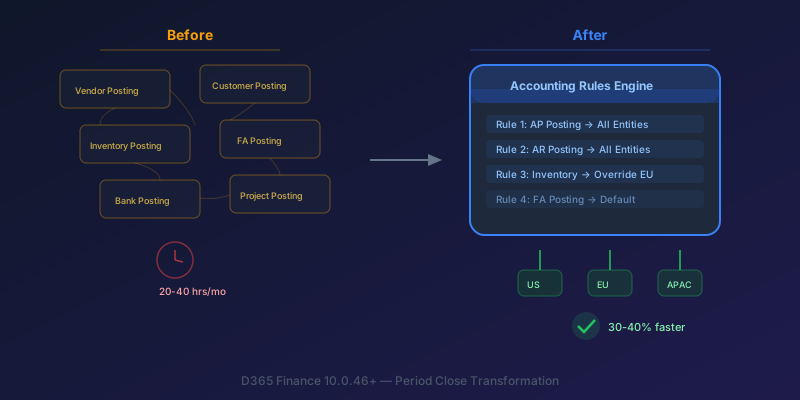
The New Accounting Rules Engine in D365 Finance: Stop Wasting 30 Hours a Month on Period Close
How the Accounting Rules Engine, multi-entity journals, flexible hierarchies, and Copilot in D365 Finance 10.0.46+ transform period close for multi-company environments.
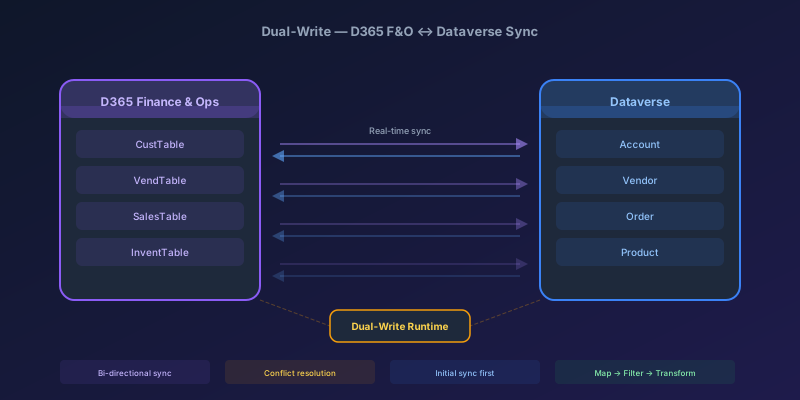
Dual-Write Between D365 F&O and Dataverse: Pitfalls and Patterns That Actually Work
A field-tested guide to dual-write configuration between D365 Finance & Operations and Dataverse — covering initial sync failures, conflict resolution, performance tuning, and when to use alternatives like virtual entities or data export service.
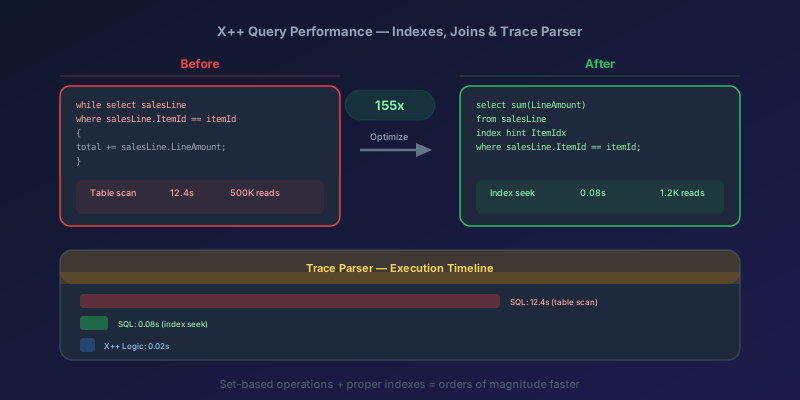
X++ Query Performance in D365 F&O: Indexes, Joins, and the Trace Parser
How to diagnose and fix slow X++ queries in D365 Finance & Operations using Trace Parser, execution plans, proper index design, join selection, and set-based operations — with real before/after examples.
Newsletter
New posts, straight to your inbox
One email per post. No spam, no tracking pixels, unsubscribe anytime.
Comments
No comments yet. Be the first.