The New Accounting Rules Engine in D365 Finance: Stop Wasting 30 Hours a Month on Period Close
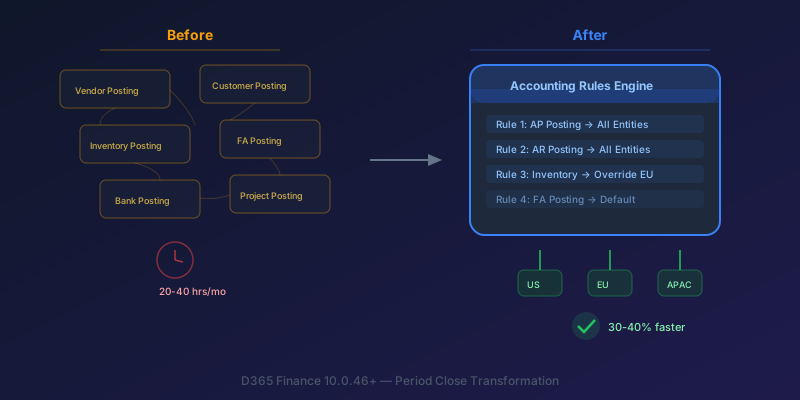
If you manage period close across five or more legal entities in D365 Finance and Operations, you already know the drill: 20 to 40 hours per month on consolidation coordination, approval workflows that stall when someone is on PTO, and a web of posting profiles spread across a dozen setup pages. The 10.0.46+ wave introduced changes that directly address this. This is not a feature summary — this is a walkthrough of what to change now.
The Old Way: Death by a Thousand Setup Pages
The legacy posting setup in D365 Finance is scattered across multiple configuration pages:
- Vendor posting profiles — one page
- Customer posting profiles — another page
- Inventory posting — yet another page
- Fixed asset posting, bank posting, project posting — all separate
Each legal entity potentially has its own configuration. Cross-entity consistency is manual and error-prone. When the chart of accounts changes, you update the same setting in five places across eight entities and hope you didn't miss one.
Then there is period close itself. The typical process looks like this:
- Finance team maintains a spreadsheet or SharePoint list tracking close tasks
- Each legal entity closes its sub-ledgers independently
- Intercompany transactions are reconciled manually — matching due-to/due-from entries across entities
- Fixed asset transfers between entities require manual journal entries on both sides
- An approver reviews and signs off. If they are on PTO, the entire chain stalls
- Consolidation and elimination entries are prepared, usually by one person who understands the full picture
The result: the "consolidation week." Finance teams spending an entire week just getting the numbers to agree across entities before anyone can start analyzing them.
The Accounting Rules Engine: One Page to Rule Them All
The new accounting rules and journal framework, surfaced in the Dynamics 365 Finance 2025 Wave 2 release plan, replaces the scattered posting-profile pages with a unified configuration surface. The exact menu path moves between releases — verify it against your environment's release notes rather than copying a path from a blog post — but it sits under General ledger setup once feature management has been turned on.
How It Works
Rules are defined as conditions paired with posting entries, evaluated top to bottom. You define the criteria (transaction type, entity, dimension values) and the posting behavior (main accounts, offset accounts, posting layer). The first matching rule wins.
The key advantage: define rules once that apply across legal entities, with entity-specific overrides only where genuinely needed.
| Task | Before (Legacy) | After (Rules Engine) |
|---|---|---|
| Configure AP posting | Vendor posting profiles page | Single rule in ARE |
| Configure AR posting | Customer posting profiles page | Single rule in ARE |
| Change a main account | Update each entity separately | Update rule, applies everywhere |
| Audit posting logic | Review 8+ setup pages | Review one rule set |
| Onboard a new entity | Copy/recreate all posting profiles | Inherit rules, add overrides |
What You Need to Know About Migration
Migration from legacy posting profiles to the rules engine is not automatic. You need to plan a phased transition:
- Start with one subledger in one legal entity (AP is usually the cleanest)
- Map your existing posting profiles to rules engine conditions
- Run both in parallel for one close cycle to validate
- Expand to additional subledgers and entities
Do not attempt a big-bang migration across all entities. The rules engine is powerful, but your existing posting profiles encode years of institutional knowledge — some of it intentional, some of it accidental. You need to validate which is which.
Multi-Company Journals and Intercompany Transfers
Multi-Entity Journal Entries
Previously, posting a cost allocation across three legal entities meant three separate journal entries, followed by intercompany elimination entries to balance the books. The new multi-entity journal capability lets you post across legal entities in a single journal.
How it works:
- Each journal line can target a different legal entity (based on your security access)
- The system automatically generates the due-to/due-from intercompany entries
- Elimination entries for consolidation are created as part of the same posting process
This is particularly useful for:
- Shared service cost allocations — IT costs split across five entities by headcount
- Intercompany billing — one entity provides services, three entities consume them
- Management fee distributions — holding company charges subsidiary entities
Automatic Intercompany Fixed Asset Transfers
Transferring a fixed asset between legal entities used to require:
- Derecognize the asset in the source entity (retirement journal)
- Recognize the asset in the target entity (acquisition journal)
- Reconcile net book value to ensure depreciation continuity
- Create intercompany settlement entries
- Update the fixed asset register in both entities
Now: initiate the transfer from the Fixed Assets module. The system handles both sides. Depreciation continuity is maintained automatically — the target entity picks up where the source left off, with full audit trail.
For organizations with frequent asset movements between subsidiaries (fleet vehicles, equipment, IT hardware), this eliminates hours of manual journal work per transfer.
Flexible Hierarchies for Financial Reporting
Flexible hierarchies let you define custom organizational structures for reporting that are independent of your chart of accounts dimension structure.
Why This Matters for Close
Consider a company with three legal entities that each use different department structures:
- Entity A: departments numbered 100-199
- Entity B: departments numbered D001-D050
- Entity C: departments using cost center codes
Rolling up a regional P&L across these three entities requires mapping each entity's dimension values into a common reporting hierarchy. Previously, this meant maintaining a parallel dimension set or building custom reports.
Flexible hierarchies let you define the rollup structure once — "North America Region = Entity A (Depts 100-120) + Entity B (D001-D025) + Entity C (CC-NA-*)" — and use it across Financial Reporter without modifying the underlying dimension values.
Practical Tip
Start with one hierarchy for one report. Validate it against your existing consolidation eliminations before building out additional hierarchies. The most common mistake is building complex hierarchies before confirming the elimination logic still works correctly.
Copilot in Finance: What Actually Works Today
Copilot is now available in D365 Finance with three capabilities that are genuinely useful during close:
Natural language queries: Ask questions in plain English against your F&O data. "Show me all unposted vendor invoices over $10,000 across all legal entities" returns results filtered by your security permissions. This is faster than building a custom inquiry for ad-hoc questions during close.
AI-generated summaries: Get a quick overview of close status — how many sub-ledger modules are closed per entity, outstanding items, pending approvals. Useful for the close coordinator who needs the big picture without opening six screens.
Finance assistant for Excel: Pull live D365 data into Excel for ad-hoc analysis. Reconciliation, variance analysis, and data preparation — without building a custom data export or Power BI report.
What Does NOT Work Well Yet
Complex multi-step close orchestration and custom report generation are not there. Copilot will not replace your close process design. It accelerates the information-gathering steps, not the decision-making or approval steps.
A Realistic Close Timeline: Before vs. After
For a typical 5-entity month-end close:
| Day | Before | After |
|---|---|---|
| 1-2 | Sub-ledger close per entity, manual journals | Sub-ledger close, multi-entity journals |
| 3-4 | Intercompany reconciliation, FA transfers | Auto-reconciliation, automated FA transfers |
| 5-6 | Consolidation, elimination entries | Flexible hierarchy-based consolidation |
| 7-8 | Reporting, review, approval chain | Copilot-assisted review, parallel approvals |
| 9-10 | Rework, corrections | Corrections with audit trail in rules engine |
Realistic expectation: a meaningful reduction in close cycle time for multi-entity organisations — but the magnitude depends entirely on how much of your existing close was manual reconciliation versus rule-driven posting. The biggest win is not speed — it is consistency and auditability. Every posting decision is traceable to a rule, every intercompany entry is system-generated, every consolidation follows the same hierarchy.
Key Takeaway
The Accounting Rules Engine is the single most impactful change to D365 Finance close processes in years, but only if you commit to migrating off legacy posting profiles. Start with one legal entity, one subledger (AP or AR), validate the results against your existing setup, then expand.
The multi-entity journal and automatic FA transfer features are immediate wins that require minimal setup changes — turn them on, test with one transaction, and start using them.
Copilot enhances visibility but does not replace process design. Use it for ad-hoc queries and status checks during close, not as a substitute for a well-defined close calendar.
If your finance team is still managing period close with a spreadsheet checklist and separate posting profiles per entity, you are volunteering for pain that the platform has already solved. The tools are here. The question is whether you will invest the 2-3 sprints needed to adopt them.
Keep reading
MCP Explained: How Claude Connects to Your Dataverse Data
An introduction to the Model Context Protocol and how the Dataverse MCP server lets Claude read and write business data through natural language.
Querying Dataverse from Claude: A Practical MCP Walkthrough
A hands-on example of using the Dataverse MCP server with Claude to query tables, create records, and update data in Dynamics 365 through natural language.
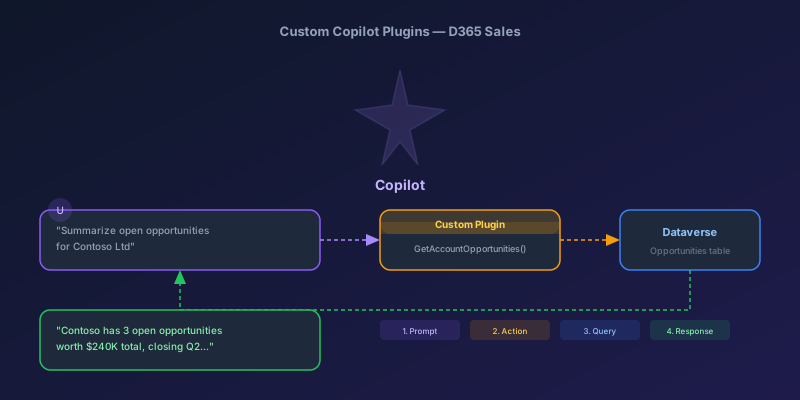
Building Custom Copilot Plugins for D365 Sales: Your First Action Step by Step
A hands-on tutorial for creating custom Copilot plugins in Dynamics 365 Sales — from defining a custom API to registering a plugin that Copilot can invoke, with real examples and permission gotchas.
Newsletter
New posts, straight to your inbox
One email per post. No spam, no tracking pixels, unsubscribe anytime.
Comments
No comments yet. Be the first.